01
01
01
Offer
Offer
Buyer, items and prices.
Buyer, items and prices.
For entrepreneurs and organizations
By industry
For collaboration
Odaberite sučelje koje odgovara uslugama koje koristite.
Invoices, quotes and advance invoices
Issue B2C, B2B, and B2G invoices and e-invoices manually, or via POS, webshop, or API. Convert a quote or proforma invoice into a final invoice without re-entering data.
Invoices, quotes and advance invoices
Issue B2C, B2B, and B2G invoices and e-invoices manually, or via POS, webshop, or API. Convert a quote or proforma invoice into a final invoice without re-entering data.
Invoices, quotes and advance invoices
Issue B2C, B2B, and B2G invoices and e-invoices manually, or via POS, webshop, or API. Convert a quote or proforma invoice into a final invoice without re-entering data.
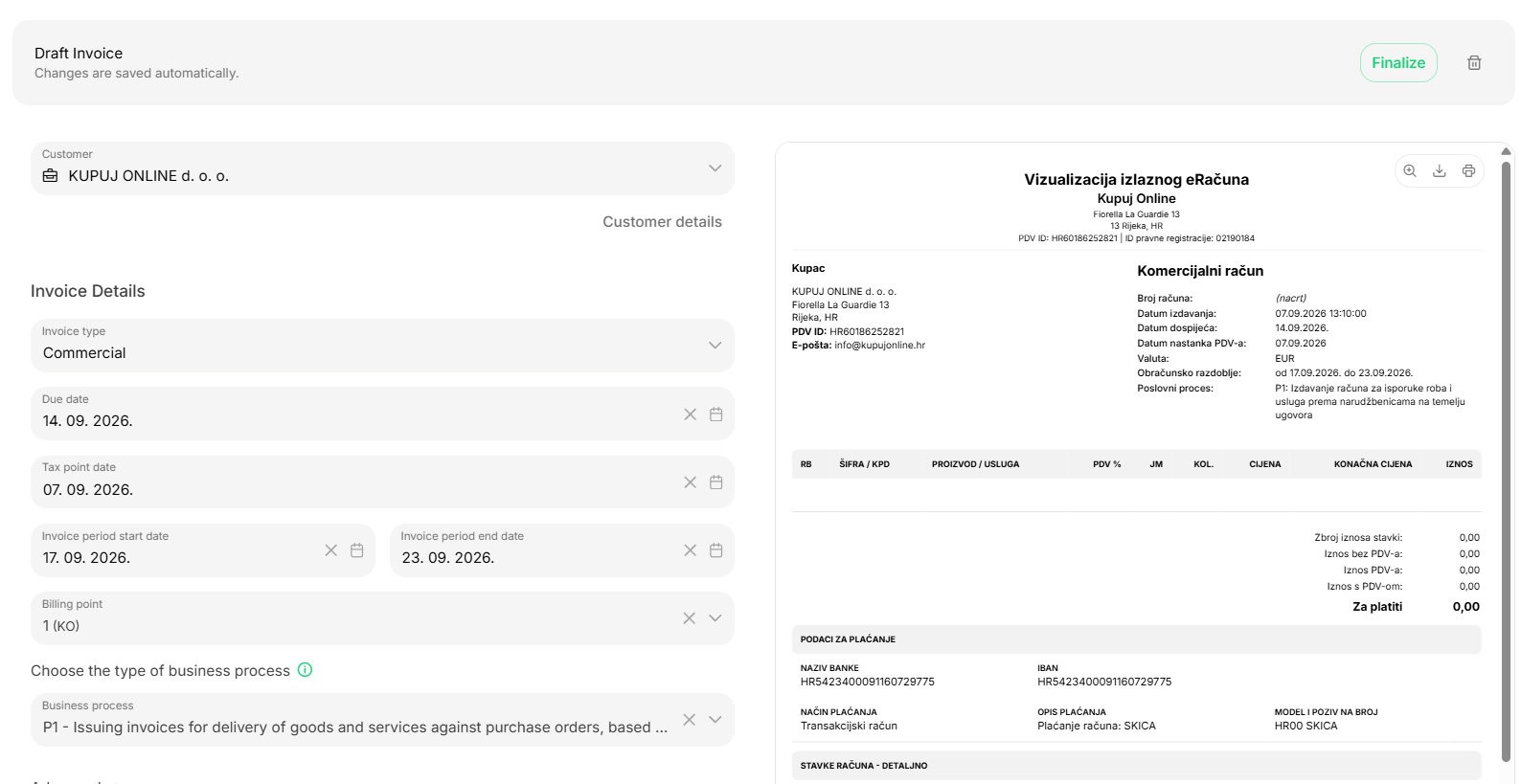
Create a quote, advance invoice, or invoice in the BillKO interface.
Create a quote, advance invoice, or invoice in the BillKO interface.
Create a quote, advance invoice, or invoice in the BillKO interface.
Search...


Search...


An online order or payment triggers invoice issuance automatically.
An online order or payment triggers invoice issuance automatically.
An online order or payment triggers invoice issuance automatically.
Take payment and issue a fiscalized invoice on the same device.
Take payment and issue a fiscalized invoice on the same device.
Take payment and issue a fiscalized invoice on the same device.
Search...

Search...

Trigger invoice issuance from your own application or sales system.
Trigger invoice issuance from your own application or sales system.
Trigger invoice issuance from your own application or sales system.
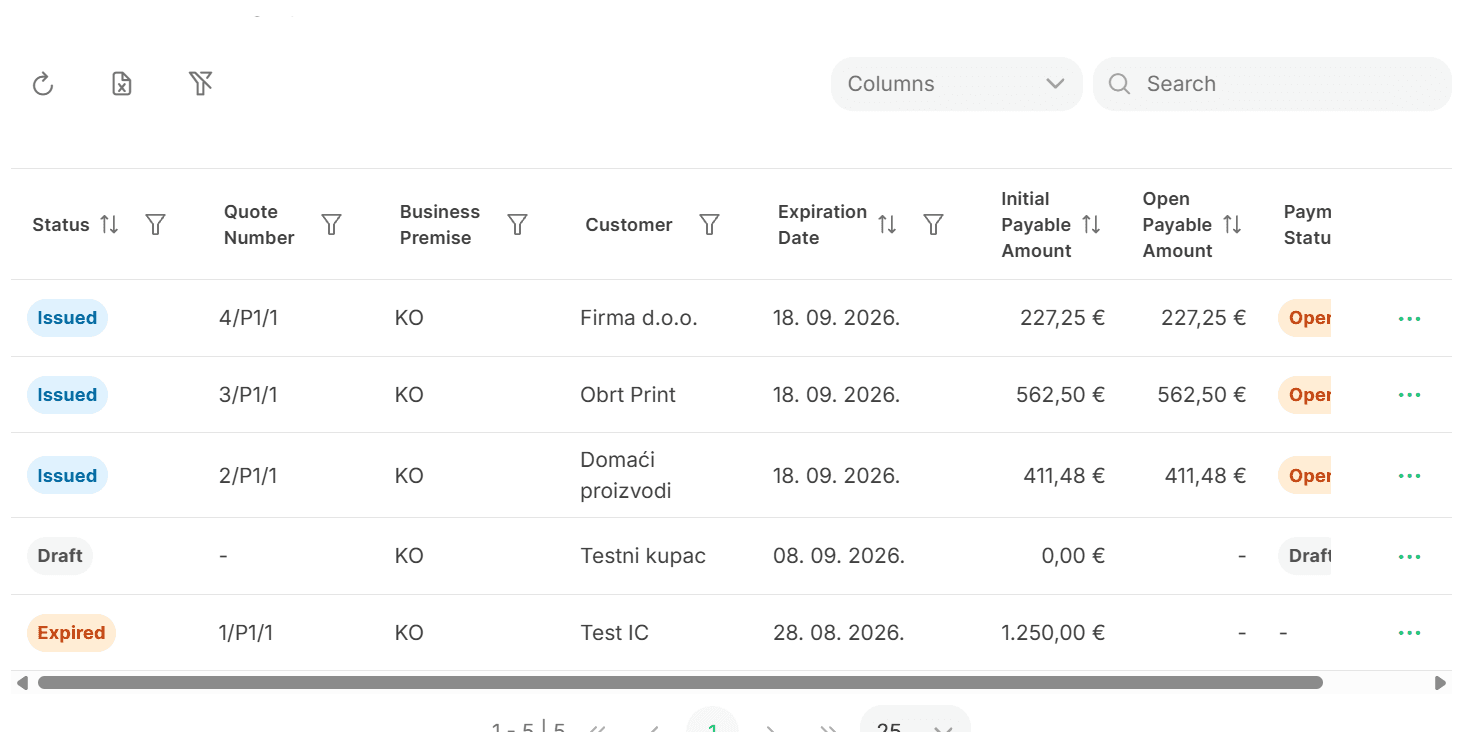
Enter the customer, items, and prices once. Turn a quote or advance invoice into an invoice, then track delivery, due date, and payment.
Enter the customer, items, and prices once. Turn a quote or advance invoice into an invoice, then track delivery, due date, and payment.
Enter the customer, items, and prices once. Turn a quote or advance invoice into an invoice, then track delivery, due date, and payment.
01
01
01
Buyer, items and prices.
Buyer, items and prices.
02
02
02
No re-entry.
No re-entry.
03
03
03
Sending, maturing and billing.
Sending, maturing and billing.
Issue invoices to customers in Croatia, the European Union, and other countries. BillKO also supports invoices that are not fiscalized based on the recipient or transaction type.
Issue invoices to customers in Croatia, the European Union, and other countries. BillKO also supports invoices that are not fiscalized based on the recipient or transaction type.
Issue invoices to customers in Croatia, the European Union, and other countries. BillKO also supports invoices that are not fiscalized based on the recipient or transaction type.
HR
Croatia
invoices for domestic customers

GLOBAL
Outside the EU
Invoices for customers outside the EU
EU
European Union
invoices for customers within the EU
Customer, items, taxes, payment method, due date, delivery, fiscalization, and payment status remain available where you work with the invoice.
Customer, items, taxes, payment method, due date, delivery, fiscalization, and payment status remain available where you work with the invoice.
Search...

BillKO supports B2C invoices for consumers, B2B invoices for business customers and B2G invoices for the public sector, including eInvoices. You can also create quotes and advance invoices, and invoices for customers in Croatia, the EU and other countries. Fiscalization applies according to the invoice type, recipient and transaction.
Yes. BillKO supports sending and receiving eInvoices, tracking their statuses, eReporting and eArchiving. Outgoing and incoming eInvoices remain available alongside other invoices and reports.
On a supported POS terminal, you connect sales and payments with invoice issuance, fiscalization and printing. In an online shop, the WooCommerce plugin or API transfers the data, and the invoice is created after an order or successful payment, as agreed. In both cases, invoice data remains in the same BillKO system.
Yes. BillKO supports invoices for customers in the European Union and outside the EU. Customer details and tax treatment are set according to the specific transaction. For example, an invoice to a foreign business customer does not become a domestic eInvoice.
Not every issued invoice follows the same fiscalization process. B2C fiscalization has exemptions set out by law, while domestic Fiscalization 2.0 applies to certain domestic transactions between covered issuers and recipients. An invoice to a foreign business customer, for example, is not automatically a domestic eInvoice. BillKO also supports invoices without fiscalization where applicable; each case depends on the recipient, transaction and tax status.
BillKO supports B2C invoices for consumers, B2B invoices for business customers and B2G invoices for the public sector, including eInvoices. You can also create quotes and advance invoices, and invoices for customers in Croatia, the EU and other countries. Fiscalization applies according to the invoice type, recipient and transaction.
Yes. BillKO supports sending and receiving eInvoices, tracking their statuses, eReporting and eArchiving. Outgoing and incoming eInvoices remain available alongside other invoices and reports.
On a supported POS terminal, you connect sales and payments with invoice issuance, fiscalization and printing. In an online shop, the WooCommerce plugin or API transfers the data, and the invoice is created after an order or successful payment, as agreed. In both cases, invoice data remains in the same BillKO system.
Yes. BillKO supports invoices for customers in the European Union and outside the EU. Customer details and tax treatment are set according to the specific transaction. For example, an invoice to a foreign business customer does not become a domestic eInvoice.
Not every issued invoice follows the same fiscalization process. B2C fiscalization has exemptions set out by law, while domestic Fiscalization 2.0 applies to certain domestic transactions between covered issuers and recipients. An invoice to a foreign business customer, for example, is not automatically a domestic eInvoice. BillKO also supports invoices without fiscalization where applicable; each case depends on the recipient, transaction and tax status.
BillKO supports B2C invoices for consumers, B2B invoices for business customers and B2G invoices for the public sector, including eInvoices. You can also create quotes and advance invoices, and invoices for customers in Croatia, the EU and other countries. Fiscalization applies according to the invoice type, recipient and transaction.
Yes. BillKO supports sending and receiving eInvoices, tracking their statuses, eReporting and eArchiving. Outgoing and incoming eInvoices remain available alongside other invoices and reports.
On a supported POS terminal, you connect sales and payments with invoice issuance, fiscalization and printing. In an online shop, the WooCommerce plugin or API transfers the data, and the invoice is created after an order or successful payment, as agreed. In both cases, invoice data remains in the same BillKO system.
Yes. BillKO supports invoices for customers in the European Union and outside the EU. Customer details and tax treatment are set according to the specific transaction. For example, an invoice to a foreign business customer does not become a domestic eInvoice.
Not every issued invoice follows the same fiscalization process. B2C fiscalization has exemptions set out by law, while domestic Fiscalization 2.0 applies to certain domestic transactions between covered issuers and recipients. An invoice to a foreign business customer, for example, is not automatically a domestic eInvoice. BillKO also supports invoices without fiscalization where applicable; each case depends on the recipient, transaction and tax status.
We will show you the manual, eCommerce, POS or API way closest to your business.
We will show you the manual, eCommerce, POS or API way closest to your business.
We will show you the manual, eCommerce, POS or API way closest to your business.


